
 eCommerce Logistics
 Oct 26, 2026
The Complete Guide to Order Processing and Order Management for eCommerce Businesses
Picture this: A customer places an order, excited to receive their purchase. But instead of a smooth, timely delivery, they face delays, missing items, or worse, no updates. Frustrating, right? In today’s fast-paced eCommerce world, your order processing system and order management isn’t just a backend function. It’s a crucial part of keeping buyers happy...
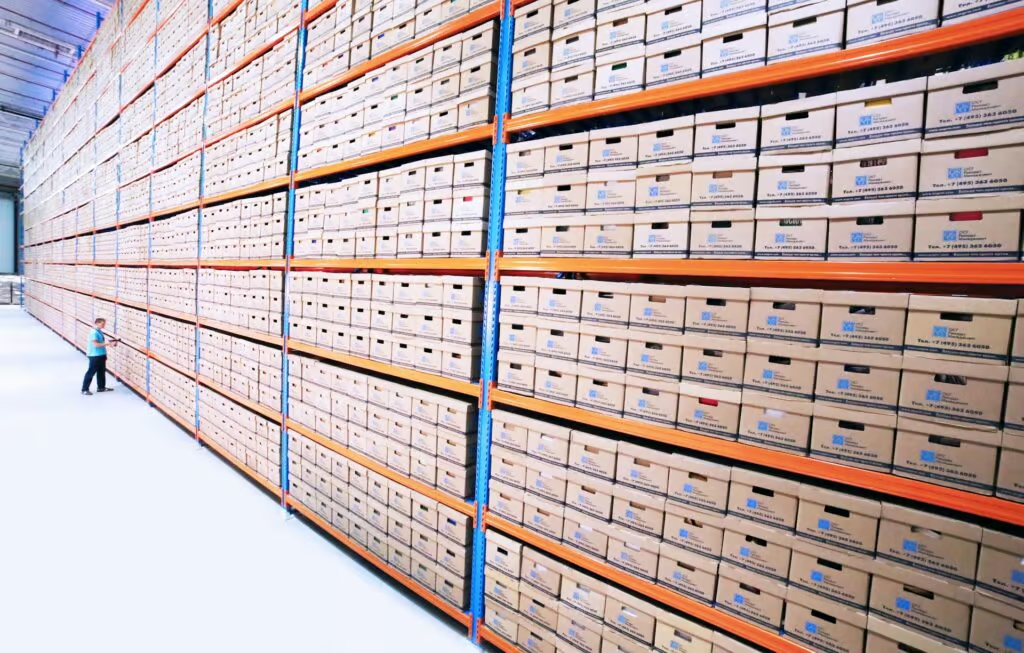
eCommerce order processing is the work between a customer clicking "buy" and the package arriving at their door: capturing the order, checking payment and stock, picking and packing the items, buying the label, handing the box to a carrier, and handling the return if one comes back. Order management is the set of rules and software sitting on top of that work. It decides which warehouse ships each order, what happens when stock runs short, and what the customer and your team can see at every stage.
In Narvar's August 2025 survey of 3,461 U.S. online shoppers, 74% had experienced late deliveries and 86% had run into at least one delivery issue. Many of those problems start before the carrier touches the box, at a handoff between systems or people.
What is eCommerce order processing?
Order processing covers every step needed to turn a placed order into a delivered one. In supply chain management, it's where customer demand turns into work for inventory, the warehouse and transportation. Each order draws down stock, tells the warehouse what to pick, and creates a shipment. If order processing runs late or sends bad data, the warehouse, the carrier and the finance team all inherit the problem.
Three terms often get used interchangeably:
| Term | What it covers | Where it usually lives |
|---|---|---|
| Order processing | The full sequence of steps from order capture to delivery and returns | Across your storefront, OMS, warehouse and carriers |
| Order management | The rules and data that steer each order: routing, holds, splits, status, inventory visibility | Your order management system (OMS), ERP or eCommerce platform |
| Order fulfillment | The physical work: picking, packing, labeling and shipping | Your warehouse, or a 3PL's |
A brand selling on Shopify with one warehouse can run all three out of the platform and a shipping tool. A brand selling on its own site, Amazon and wholesale from two warehouses needs order management as its own layer, because something has to decide where each order goes before anyone picks it.
The eCommerce order processing steps, from capture to returns
Operations name these steps differently, but the sequence is the same.
1. Order capture
The order comes in from a storefront, a marketplace such as Amazon or Walmart, a wholesale EDI feed, or a customer service rep keying in a phone order. Each channel sends data in its own format. The first job is to pull all of it into one place and normalize it: the same SKU naming, the same address fields, the same shipping service codes. Orders that arrive with a channel-specific SKU that doesn't map to your catalog are one of the most common reasons an order sits unprocessed.
2. Validation
Before an order is released, it gets checked. Payment is authorized. Fraud rules flag orders with mismatched billing and shipping addresses or unusual quantities. Addresses are validated against carrier or postal data, which catches missing apartment numbers and typos before they turn into a returned-to-sender package and an address correction fee. Orders that fail a check go to a hold queue, and someone needs to own that queue daily. Holds that nobody reviews turn into late orders.
3. Inventory allocation and order routing
The system reserves stock against the order and decides where it ships from. With one warehouse that's simple. With two or more, routing rules weigh stock on hand, distance to the customer, and the cost of splitting an order across locations. A customer in Ohio ordering two items that are both in stock in Kentucky should ship from Kentucky in one box, not from two buildings in two boxes. If an item is short, the rules decide whether to backorder it, ship what's available, or hold the whole order.
4. Picking
The order is released to the warehouse management system (WMS), which creates a pick task. Pickers work from a scanner or pick list, one order at a time for low volume or in batches, zones or waves as volume grows. Our guide to order batching and consolidation covers how to choose a method. Whatever the method, every pick should be confirmed with a barcode scan, not by eye.
5. Packing
At the pack station, the packer scans each item again to confirm it matches the order, chooses a box or mailer, adds dunnage and any inserts, and seals it. Box choice is a cost decision as much as a packing one. Carriers bill on the greater of actual weight and dimensional weight, so a small item in an oversized box can cost far more to ship than it should.
6. Labeling and carrier selection
Once the box is packed, weighed and measured, the system buys a label. The lowest base rate is often not the lowest real cost once residential, fuel and DIM charges land on the invoice, so compare the full cost across carriers for each package at label print. Timing matters here too: each carrier has a daily pickup cutoff, and an order packed ten minutes after the truck leaves loses a day.
Shipping is often one of the largest costs on an order. One food and beverage brand saved $226K, or 16%, on $1.4M in annual shipping spend with managed shipping, by changing its carrier mix and its cartons to cut dimensional weight charges, with no price increase to customers.
7. Tracking and delivery
When the carrier scans the package, the tracking number and status should flow back to your OMS and storefront automatically, and the customer should get a shipping confirmation with a delivery estimate. Customers care about that estimate before they buy: in the same Narvar survey, 73% said estimated delivery dates influence their purchase decisions. Between ship and delivery, your team should be watching for exceptions (stalled scans, failed delivery attempts, damage) rather than waiting for the customer to email.
8. Returns
The National Retail Federation and Happy Returns estimated that 19.3% of online sales would be returned in 2025, against 15.8% of total retail sales. Each return needs an authorization, a label, a receiving step at the warehouse, an inspection to decide whether the item goes back to sellable stock, and a refund or exchange. If the returned item isn't counted back into inventory quickly, you'll show it as out of stock while it sits on a dock.
What an eCommerce order management system does
An order management system (OMS) is the software that holds the order record from capture to return and applies your rules along the way. A useful OMS does six things:
- Pulls orders from every channel into one queue, with SKUs and addresses normalized.
- Shows available-to-sell inventory across all locations and pushes it back to each channel so you don't oversell.
- Routes orders to the right warehouse based on stock, distance and split rules.
- Holds and releases orders based on fraud, payment, address or stock checks.
- Tracks status from released to picked, shipped, delivered and returned, and shares it with customer service and the customer.
- Records returns, refunds and exchanges against the original order.
The OMS decides what should happen to an order. The WMS runs the warehouse: locations, pick paths, pack verification, inventory counts. The transportation management system (TMS) picks the carrier and service, buys the label and tracks the shipment. Many problems in order processing come from these three systems disagreeing about stock or status. For how the warehouse and transportation layers fit together, read WMS and TMS: helping or holding back your business?
Choosing an order processing system
There are four common setups:
- Platform tools. Shopify, BigCommerce and similar platforms handle orders from a single storefront well. They get strained once you add marketplaces, wholesale or a second warehouse.
- A standalone OMS. Worth it when you sell on several channels or ship from more than one location and need routing rules and a single inventory view.
- An ERP. Makes sense when order management has to tie tightly to accounting, purchasing and manufacturing. Usually more than a DTC brand needs on its own.
- Your 3PL's systems. If you outsource fulfillment, the 3PL's WMS and integrations often cover much of the order management layer, and your storefront connects to them directly.
The deciding question is whether inventory and order status stay in sync across every system without someone fixing them by hand. If your team exports spreadsheets to move orders between systems, that's the step to automate first.
Where order processing errors and delays come from, and how to fix them
Inventory that's out of sync
When the storefront shows stock the warehouse doesn't have, you oversell, then cancel or backorder. The usual causes are batch inventory syncs that run every few hours, returns not received back into stock, and unrecorded damage. Fix: sync available-to-sell inventory from the WMS to every channel in near real time, set a small safety buffer on fast movers, and cycle count the SKUs that cause the most oversells.
Bad order data
Unmapped SKUs, missing apartment numbers and wrong shipping service codes stop orders in a hold queue or send them to the wrong place. Fix: validate addresses at checkout and again before release, map every channel's SKUs to one catalog, and review the hold queue at least twice a day.
Mis-picks and mis-packs
The wrong item, the wrong quantity or the wrong label is expensive: you pay to ship it, pay to bring it back, and pay to ship the replacement. Fix: scan at pick and again at pack, label look-alike SKUs clearly, and track errors by picker and SKU. Our guide on improving order accuracy covers this in more depth.
Missed carrier cutoffs
An order placed at 10 a.m. can still miss same-day shipping if the warehouse releases orders in one big wave after lunch. Fix: release orders to the floor in several waves through the day, set a published order cutoff that matches your latest carrier pickup, and measure how many orders received before cutoff actually ship the same day.
The wrong carrier or service
Defaulting every package to one carrier and one service level means paying for two-day speed where ground would arrive just as fast, or paying residential and DIM charges another carrier wouldn't apply. Fix: choose carrier and service per package at label print, using the full landed cost and the delivery promise you made at checkout.
Volume spikes
Promotions and the holiday peak can double daily order volume, and the steps that were barely keeping up break first. Fix: forecast volume by week, staff and stock to it, agree on peak capacity with your carriers ahead of time, and tell customers your shipping cutoffs before they buy. Delivery speed affects conversion as well as satisfaction: in Baymard Institute's survey of U.S. online shoppers who abandoned an order, 20% said delivery was too slow, and 40% left because extra costs such as shipping, tax and fees were too high.
Order processing metrics worth tracking
- Order cycle time: hours from order placed to carrier scan. Break it down by step to see where orders wait.
- On-time ship rate: share of orders that leave the building by the promised ship date.
- Order accuracy: share of orders shipped with the right items, quantities and address.
- Dock-to-stock time: how long received inventory, including returns, takes to become available to sell.
- Fulfillment cost per order: pick, pack and materials cost divided by orders shipped.
- Shipping cost per order and as a share of order value: the number finance cares about most, and the one that moves most with carrier choice.
- Return rate and return processing time: by SKU and reason, so returns feed back into product and listing fixes.
In-house order processing vs outsourcing to a 3PL
Order processing services from a third-party logistics (3PL) provider take over the physical side of the process: receiving, storage, pick and pack, labeling and carrier handoff, and often returns. You keep the storefront and the customer relationship; the 3PL's WMS connects to your channels and sends tracking back.
Running it yourself makes sense when volume is low enough that the owner or a small team can pack orders without falling behind, when products need hands-on handling you don't want to teach anyone else, or when you already have warehouse space and staff you're paying for regardless.
Outsourcing starts to make sense when one or more of these is true:
- Order volume swings enough that you're either short-staffed at peak or paying idle labor the rest of the year.
- You need a second location to reach customers faster, and opening one yourself means a lease, staff and a new WMS.
- Error rates or late shipments are climbing as volume grows.
- Your carrier rates are based on your own volume alone, and a fulfillment network's shared volume would get you better ones.
Before signing, ask for the 3PL's order accuracy and dock-to-stock numbers and how it measures them, its carrier cutoffs, which of your channels it integrates with, and how it bills for shipping. Our hands-on guide to choosing a 3PL partner lists the questions to ask.
Fulfillment and shipping are separate jobs, even when one partner does both. The 3PL runs the warehouse, and managed shipping handles carrier contracts and rate shopping underneath it. Gnarly Nutrition moved its fulfillment to iDrive in 2020 and grew 40% year over year from 2020 to 2023 inside that combined relationship, with fulfillment, real-time WMS visibility and carrier optimization handled together.
If you want to know what your current order mix is costing you to ship, start with a carrier market analysis of your last 12 months of shipments.
Related articles
-
 eCommerce Logistics
Oct 21, 2022
Warehouse Management Best Practices: 5 Tips for Optimized Processes
Read moreWarehouses are the heart of many companies, but operations can be difficult to manage. Continual improvement is the best approach to overcoming this challenge. In this article, we’ll discuss the industry’s best practices for warehouses.
-
 eCommerce Logistics
Dec 30, 2024
Prevent Stockouts: 5 Ways to Avoid Going out of Stock
Read morePlenty of businesses have been missing out due to out-of-stock issues over the last few months. So how can you avoid losing money because of out-of-stock problems? One of the best ways is by implementing technology that fosters visibility.
-
 eCommerce Logistics
Feb 03, 2025
8 Effective Ways to Offer Free Shipping
Read moreAmid all the talk of recession and the eye-popping statistics on inflation, many businesses are turning to a strategic focus: customer retention. There are many ways to do this, but one that quickly comes to mind is shipping experience.